Toolbox: The Industrial-Grade Font for Bold Branding
There is a specific challenge in design that often goes unsolved until you see the perfect solution: how to communicate strength, reliability, and a hands-on work ethic without looking cluttered. We have all seen the stock "construction" fonts that look cheesy or the overly technical fonts that are impossible to read. However, finding a typeface that bridges the gap between industrial grit and modern polish is rare. Enter Toolbox, a striking display font that captures the essence of mechanics, construction, and rugged durability while maintaining a clean, contemporary aesthetic. It is a visual representation of getting the job done, making it an invaluable asset for designers, entrepreneurs, and creators looking to make a bold statement.
The Visual Anatomy of a Workhorse Typeface
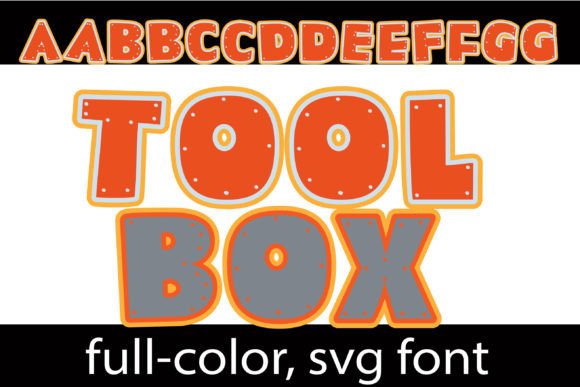
What sets Toolbox apart from the crowd is its distinct visual personality. This is not just another blocky sans serif; it is a full-color SVG font that brings a unique, tangible texture to digital typography. The design features a heavy, blocky structure in vibrant orange and industrial grey. This color combination is deliberate, evoking the look of heavy machinery, safety equipment, and high-visibility tools. The texture does not stop at the color palette. If you look closely, you will notice small "bolts" integrated into the letterforms. These details give the font a three-dimensional, physical quality that makes it pop off the screen or page.
The font is designed as a premium font that serves a specific niche: high-impact titles and displays. It works best when used at larger sizes where the intricate details of the color and the bolt textures can be fully appreciated. Because it is a full-color font, it eliminates the need to manually layer shadows or textures in design software like Photoshop or Illustrator. You simply type, and the depth and dimension are already there. Furthermore, Toolbox includes an alternate case with additional colors, accessible through your system or Silhouette’s glyph map, allowing you to tweak the palette to fit specific branding requirements without losing the core industrial vibe.
Unlocking the Power of Color Fonts (SVG)
For many designers, the concept of a color font might still be relatively new, but it is a technology that is rapidly changing the landscape of typography. Toolbox utilizes the OpenType full-color (SVG) format. In technical terms, this means the font file contains vector graphics with color information embedded directly within the glyphs. In practical terms, it means you can have complex textures, gradients, and multi-colored letters without rasterizing your text or turning it into an image. You can still edit the spelling, resize it, and align it just like any standard text.
However, there are some technical nuances to keep in mind to ensure your workflow remains smooth. First, compatibility is key. Toolbox is compatible with major design software that supports SVG fonts, including Adobe products (Photoshop, Illustrator, InDesign), Silhouette Studio, Quark, and Inkscape. It installs just like any standard .OTF file—via FontBook on Mac or your preferred font manager/Control Panel on Windows.
A common hurdle with color fonts is visibility in unsupported environments. It is important to note that color fonts will show as black in non-compatible programs. For example, older versions of Microsoft Word or simple text editors may not render the orange and grey colors, displaying a solid black silhouette instead. Even in programs that do support color fonts, the preview window or font menu often displays them in black. Do not panic if you see this; once you type the text onto your document canvas, the full color should render. If it remains black, it is a signal that your specific software version does not support SVG typography, and you may need to upgrade or switch to a compatible platform.
Strategic Applications for Maximum Impact
The utility of Toolbox extends far beyond simple headers. Its industrial aesthetic makes it a powerhouse for specific branding and marketing scenarios. If you are building a brand identity for a construction company, a hardware store, a mechanic shop, or even a DIY craft channel, this font instantly communicates your industry without a single word of explanation. It serves as an immediate visual shorthand for "hard work" and "quality craftsmanship."
Consider the following applications where Toolbox can elevate your design assets:
- Packaging Design: For products like power tools, artisanal hardware, or even rugged outdoor gear, Toolbox provides shelf appeal. The bold colors grab attention, and the texture implies a durable, high-quality product inside.
- Social Media Graphics: In the endless scroll of a feed, standard text gets ignored. Using Toolbox for YouTube thumbnails, Instagram stories, or Facebook headers creates an immediate visual stop. It is particularly effective for "How-To" content or project reveals.
- Branding and Logo Design: While it is a display font and might not be suitable for long paragraphs, it is excellent for logotypes and wordmarks. A plumbing service or a landscaping business using Toolbox in their logo projects reliability and strength.
- Merchandise and Apparel: T-shirts, hats, and workwear benefit from the rugged look of this typeface. It translates well to physical products because the design mimics the look of printed work gear.
- Posters and Event Invitations: Hosting a trade show, a garage sale, or a community build event? Toolbox fits the theme perfectly, setting the mood before the audience reads the details.
Mastering Font Pairing and Readability
Because Toolbox is a heavy, textured display font, it has a specific role in your typographic hierarchy. It is the "shout," not the "whisper." One of the most common mistakes in modern typography is using a decorative font for body copy. Toolbox is designed for titles, headers, and short bursts of text. If you use it for a full paragraph, the texture will become visually fatiguing, and the readability will plummet.
To create a professional presentation, you must pair Toolbox with a clean, neutral typeface. Since Toolbox is blocky and industrial, it pairs exceptionally well with simple sans serif fonts or clean serif fonts. Think of fonts like Open Sans, Roboto, or Montserrat for your body text. These simple fonts provide a visual "rest" for the viewer's eyes, allowing the Toolbox header to shine without overwhelming the layout.
When choosing your font style, consider the context of your project. If you are designing for a modern, sleek brand that wants to hint at industrial roots, stick to the standard orange and grey. If you are working on a vintage or retro project, utilizing the alternate case colors might give you the specific hue needed to match a retro color palette. Always test your font pairings by placing a sample header in Toolbox next to a paragraph of your chosen body text. Ensure the scale is balanced—usually, a display font like this needs to be significantly larger than the body copy to maintain visual consistency and hierarchy.
Leveraging Typography for Brand Recognition
Typography is one of the most powerful tools for brand recognition. When a customer sees a specific font style repeatedly, they begin to associate that visual shape with your business. By incorporating Toolbox into your marketing assets, you are borrowing from the psychological associations of the construction and industrial world. You are telling your audience that you are solid, dependable, and built to last.
For creative entrepreneurs and content creators, this font offers a way to stand out in a saturated market. Instead of blending in with the thousands of brands using generic sans serifs, you can use Toolbox to inject personality into your digital products. Whether you are selling Canva templates, digital planners, or printable wall art, the industrial aesthetic appeals to a specific, passionate audience. It moves your designs from "generic" to "intentional."
Ultimately, Toolbox is more than just a collection of letters; it is a design asset that brings a specific vibe to your work. It solves the problem of how to look professional yet rugged, modern yet classic. By understanding its technical capabilities—such as the SVG format and compatibility requirements—and applying it to the right contexts, you can harness its full potential. Whether you are labeling a toolbox in real life or building a digital empire, having the right font in your kit makes all the difference.